



Updated on
WordPress 7 is introducing a new connector-based approach for AI, and WP Security Ninja is already using it.
If you are testing WordPress 7 beta, you can already use the new AI Security Advisor in WP Security Ninja to generate structured security audits based on real Security Ninja data from your site. This is available for all users right now. Pro adds extra depth, but the core experience is not limited to Pro.
That matters because it makes this more than a marketing bullet. It is a real feature, built around the new WordPress 7 AI connector flow, and ready for people already testing the beta.
Contents
Built for the new WordPress 7 AI flow
The AI Security Advisor is designed to work with WordPress 7’s new AI client path. Users configure their AI setup through WordPress, and WP Security Ninja then lets them use that connector directly from the Security Advisor screen. In the current implementation, the plugin recognizes connector options for OpenAI, Google, and Anthropic.
Instead of inventing a completely separate AI setup inside the plugin, WP Security Ninja follows the direction WordPress itself is moving toward.
A practical use of AI inside Security Ninja
The AI Security Advisor is focused on one job: turning Security Ninja data into a structured security audit that is easier to review and act on.
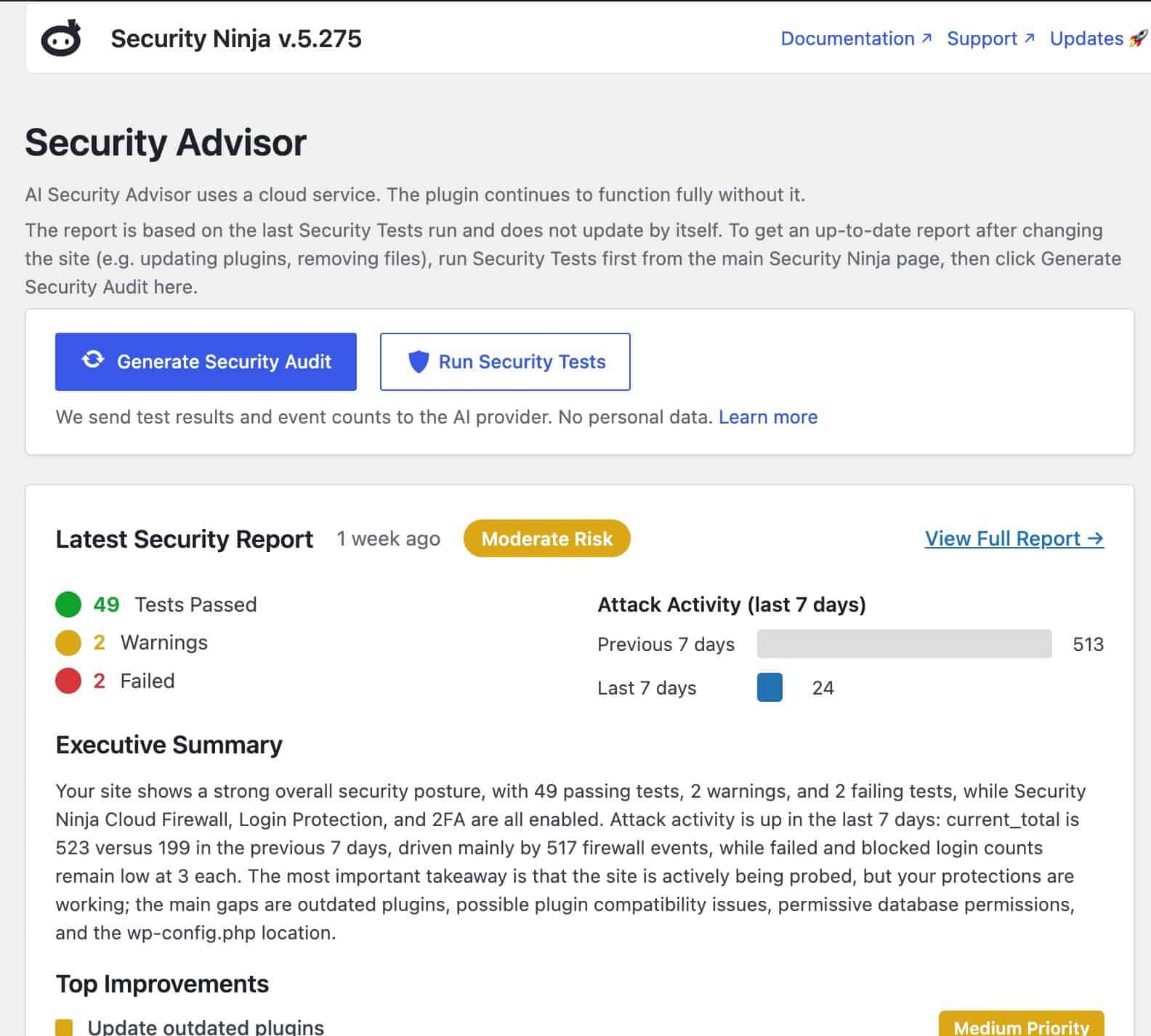
When a report is generated, the plugin builds a privacy-oriented JSON context from data already available in WP Security Ninja, including security test results, feature flags, and aggregated event counts. That context is sent through WordPress’s AI client API, and the returned response is rendered as a structured report inside wp-admin.
The result is not just a raw response dumped on the screen. The report is organized into sections such as executive summary, security overview, improvements, and activity, which makes it much easier to review than a pile of technical findings on their own.
The goal is to make the advise practical and actionable for users, instead of having to understand a big technical report. With the evolution of AI and the integration we hope to make it more and more useful for users. Imagine proactive recommendations for improvements, or even just a quick overview of the security status of your site.
What users can do right now
Inside Security Ninja → Security Advisor, users can choose a configured connector, preview the exact context data that will be sent, and generate a full security audit on demand. Reports can also be stored locally for history, which means the output is not limited to a single one-time interaction.
That gives site owners and administrators something concrete:
- a clear admin-side workflow
- a structured security report generated from real plugin data
- visibility into the context being sent for analysis
- stored reports for later review
This is exactly the kind of AI feature that is more interesting when it is understated. It has a defined purpose, it fits into an existing workflow, and it is already useful without pretending to be magic.
Available for all users
It is worth stating this clearly: the AI Security Advisor is not a Pro-only feature.
Both Free and Pro expose the Security Advisor when the module loads. Pro changes what the model is allowed to recommend and expands some of the improvement deep links inside the plugin, but the main AI Security Advisor flow itself is already available to all users.
That makes this especially relevant for WordPress 7 beta testers, because anyone exploring the new connector flow can already try it in WP Security Ninja without the feature being presented as some locked-away future promise.
How to try it on WordPress 7 beta
If you want to test the feature, the flow is simple:
- Use a WordPress build that includes the new AI client support
- Configure a supported connector in Settings → Connectors
- Install and activate WP Security Ninja
- Run Security Ninja tests so there is data to work from
- Open Security Ninja → Security Advisor
- Optionally preview the data that will be sent
- Select the connector you want to use
- Click Generate Security Audit
- Review the generated report in wp-admin
If WordPress AI support is not available, the plugin shows a WordPress 7 required screen instead of the full advisor interface.
Designed to be transparent
One of the better details in the implementation is the preview option. Users are not forced to blindly trust what is being sent. They can inspect the context payload before generating a report, which is the right approach for a feature dealing with security-related site data.
The generated reports are also stored locally in the plugin’s report table, giving users a history they can refer back to over time. That makes the Security Advisor feel like part of the product rather than a disposable AI prompt box.
Focused, not bloated
The AI Security Advisor is a manual, on-demand tool. It is not trying to be a chatbot, and it is not pretending to be an always-running background system. Users run it when they want a structured audit, and the plugin returns a full report once the request is complete.
That restraint is a good thing. It keeps the feature tied to a clear purpose: helping users interpret security data from their site through a cleaner, more readable audit workflow.
What it is not
The current implementation is strong, but lets talk about what it is not.
This is not a chat interface. It does not stream token-by-token output. It does not include a separate WP Security Ninja-hosted AI backend. It does not automatically regenerate reports in the background whenever tests change. It is a focused admin-side security audit flow built around the WordPress AI client path.
That is not a weakness. It is simply the real scope of the feature today, and that scope is already useful.
Why this matters now
Instead of waiting until the dust settles, WP Security Ninja already gives beta testers a practical way to use the new WordPress AI connector flow inside a real plugin. That makes it easier to test not just the connector setup itself, but also what useful AI-assisted workflows inside WordPress can look like in practice.
Try the AI Security Advisor
If you are testing WordPress 7 beta, configure a supported connector, open the Security Advisor in WP Security Ninja, and generate a report.
You will get a structured AI-based security audit built from real Security Ninja data, directly inside wp-admin.
Get AI-Powered Security Summary
Let AI analyze this WordPress security article and provide actionable insights from WP Security Ninja experts.
