“Neapolitan backdoor injection” is not a named malware family or a public CVE campaign. It is a teaching metaphor. Neapolitan ice cream stacks three flavors in one package. Attackers often stack several persistence tricks in one compromise: a small dropper, a larger webshell, obfuscated copies of the same backdoor, and sometimes a database hook that puts files back after you delete them.
If you only remove the obvious file, the other “flavors” reopen the door. This post maps that pattern to real WordPress locations and detection habits. For the broader playbook, see WordPress backdoor hacks and malware removal.
What a backdoor does after injection
A backdoor bypasses normal login so an attacker can return, run commands, change files, or update their malware remotely. After a successful inject you may see:
- Site defacement or spam content
- Data theft from the database or
wp-config.php
- Outbound abuse (spam, phishing pages, malware distribution)
- Server resources used in wider attacks
- Silent admin accounts or scheduled reinfection
A common install path historically involved remote file inclusion (RFI) and other upload or include vulnerabilities. Today the same outcome more often comes from unpatched plugins, stolen admin sessions, or nulled themes. The persistence pattern after access is what matters for cleanup.
How layered infection usually works
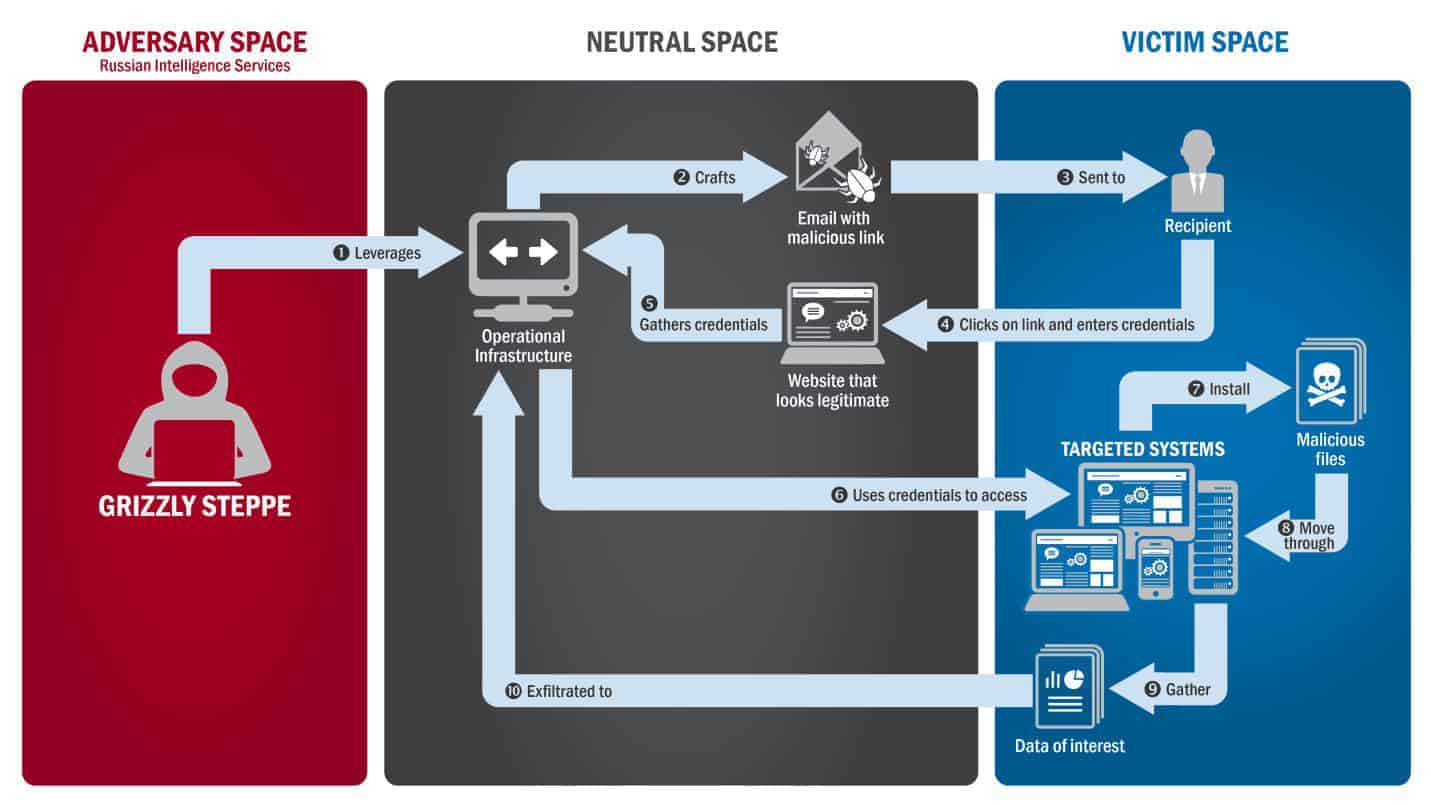
Attackers rarely pick targets at random. Scanners look for outdated plugins, open install.php leftovers, weak credentials, and known CVEs. Once they get a foothold:
- Dropper: a small file that fits under upload size limits or blends into an existing folder.
- Payload: the dropper fetches or unpacks a larger backdoor or webshell.
- Copies: extra variants in themes,
mu-plugins, uploads, or core so deleting one file is not enough.
- Optional reinfection: cron,
shutdown hooks, or database options that rewrite the shell later.
Fixing the original vulnerability without removing every persistence point still leaves remote access open.
How attackers cover their tracks (obfuscation)
Scanners look for strings like eval( and base64_decode(. Attackers break those strings so naive greps miss them. A classic teaching example is concatenation:
// Looks harmless to a simple string search; PHP still runs eval.
$fn = 'ev' . 'al';
$fn( $_POST['x'] );
Other tricks include hex escapes, compressed payloads, code stored in the database and executed via assert or dynamic includes, and dozens of near-duplicate files with different names. If you find one backdoor, assume siblings exist. Leaving a single copy is enough for reinfection.

Practical WordPress places to check
Use this as a hunt list, not folklore:
Compare against clean copies of core, themes, and plugins. Hand-editing one obfuscated line while leaving three copies elsewhere wastes the afternoon.
How to find layered backdoors
There is no single magic scan. Combine:
- File integrity monitoring against known-good WordPress core (and package checksums for themes/plugins when you have them)
- A malware scanner for known signatures and suspicious PHP
- Recently modified files on the server:
find ./ -type f -mtime -15
- User audit: unknown administrators, odd email addresses, unexpected roles
- Host or pro cleanup when reinfection continues after you delete the first shell
Prevention beats archaeology: keep software updated, use strong unique passwords with 2FA, drop unused plugins and themes, and put mass exploit traffic behind a firewall.
If the site is already serving spam or phishing, follow hacked site steps end to end. Removing “99 of 100” backdoors still leaves a working door.
Bottom line
Treat “Neapolitan” as a reminder that persistence comes in layers, not as a brand name for one attack. Hunt uploads, themes, mu-plugins, core, and the database. Restore clean packages when you can, close the entry hole, rotate credentials, and keep scanning until nothing new appears.

