

Failed to connect to api.freemius.com
Fix the “Failed to connect to api.freemius.com” error by clearing the API cache and syncing your license. Read our guide for detailed steps.
Fix the “Failed to connect to api.freemius.com” error by clearing the API cache and syncing your license. Read our guide for detailed steps.
Understand the compatibility of Security Ninja with WordPress.org and WordPress.com. Discover why Security Ninja Pro isn’t compatible with the hosted version of WordPress.
Welcome to our Privacy Policy Your privacy is critically important to us. In order to bring you the best experience, we […]
FAQ for WP Security Ninja Do you have a public roadmap? We maintain a public roadmap available at https://wpsecurityninja.com/roadmap/. Feel free to […]

Explore the importance of a well-structured URL for SEO and user experience. Learn how effective URLs enhance site visibility, improve Google PageRank, and make navigation intuitive.

A practical approach to protecting WooCommerce revenue paths: checkout and coupons, rate limits, monitoring, and safe tuning.
WordPress backup security represents a critical component of comprehensive website protection, with over 68% of WordPress websites experiencing backup-related security incidents annually. […]
WordPress Security scanning has become essential for maintaining website integrity in 2025, with cyber attacks targeting WordPress sites increasing by 200% over […]
Content Security Policy (CSP) is a powerful security feature delivered via HTTP response headers that helps protect your WordPress site from Cross-Site […]
Help us to Make the web more secure JOIN THE AFFILIATE PROGRAM Security Ninja Affiliate Program Want to help us grow and […]

Security Testing for WordPress websites The Security tests combine years of know-how in WordPress security and provide a comprehensive overview of everything […]
WordPress firewall protection has become essential for website security in 2025, with web application attacks increasing by 250% over the past year. […]
Understand the automatic validation process for known crawlers in Security Ninja, ensuring legitimate crawlers are not blocked and your site remains properly indexed.

As a beginner, WordPress could provide a dream start to your website, but you’re also likely to make some common mistakes.
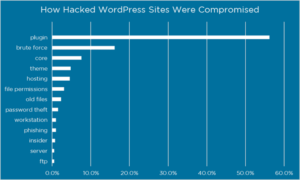
Find out all about the reasons behind significant Word Press security vulnerabilities and how to mitigate them.

Your WordPress site is a prime target for hackers, and relying solely on security plugins can be a double-edged sword. While they […]

Using search engines is the number one factor that drives website traffic. On average, there are 63.000 google searches per second. Google […]
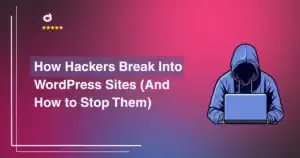
Hacking is illegal. We do not promote or encourage illegal hacking. WordPress powers over 40% of websites globally, making it a prime […]
If you’re encountering “Error 153: Video player configuration error” when embedding YouTube videos on your WordPress site, especially when WP Security Ninja […]

Since the earliest days of the Internet, search engine optimization (SEO) has been a vital consideration for website owners. While acceptable SEO […]
Instructions on using WP Security Ninja license on dev and staging sites. Our guide ensures you can manage and protect your testing environments efficiently.

Remote work has made life more flexible, but it has also increased cybersecurity risks. Cybercriminals target professionals accessing sensitive data outside secure […]
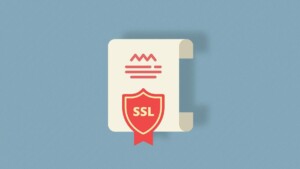
You should understand what SSL certificates are and how they can help secure the communication between your server and your visitors.

Web security has not been traditionally thought of as something marketers need to concern themselves with, but it looks like things are […]

A simple way to easily create a new admin user via a backdoor – easy to use copy-paste code.
Get started with Security Ninja Thank you for buying Security Ninja ♥ Simple installation: Check Your Email: After your purchase, you will […]
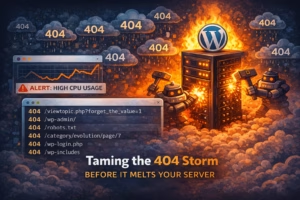
Bot noise can look like random hosting issues. find the 404 hammering pattern and stop wasting resources on junk requests.
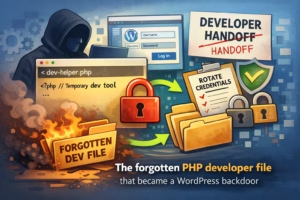
One “temporary” PHP file can give full access without logging into WordPress. see the signs, the cleanup steps, and the offboarding routine to use next time.
WordPress security represents one of the most critical decisions website owners face in 2025. With cyber attacks targeting WordPress sites increasing by […]

WordPress controls over 43% of all sites worldwide, making it a famous target for hackers. A site’s login page that isn’t significant […]
We recently concluded our exciting Security Tip Contest, where participants shared their top insights to help secure WordPress websites. It was amazing […]

Phishing – Understanding how to protect yourself from safe-looking emails that are designed to make you click a malicious link or roque attachment.

Learn how to protect your WordPress website with proper password management with a few but important tips.

With the increase in cyber threats, securing a WordPress Multisite network is more crucial than ever. Find out how to strengthen your security posture with our expert tips and best practices.
