Early Firewall (Pro) can inspect a request before WordPress, plugins, and themes load. It uses PHP auto_prepend_file for that site. The normal firewall still runs for anything Early Firewall does not handle.
Leave it off if you are happy with the WordPress-hooks firewall. Existing sites stay on that mode until you enable Early Firewall yourself. It is not turned on by a plugin update.
What you gain
A bad request is stopped before WordPress boots. That covers a lot of exploit probes, scanner noise, and requests that match your compiled firewall rules.
Login protection, two-factor authentication, and store rate limits still need WordPress. Early Firewall does not replace those. It runs the request checks (and the bans and country rules compiled into its config) earlier.
Where to turn it on
On Security Ninja → Firewall → Settings, scroll to Early Firewall.
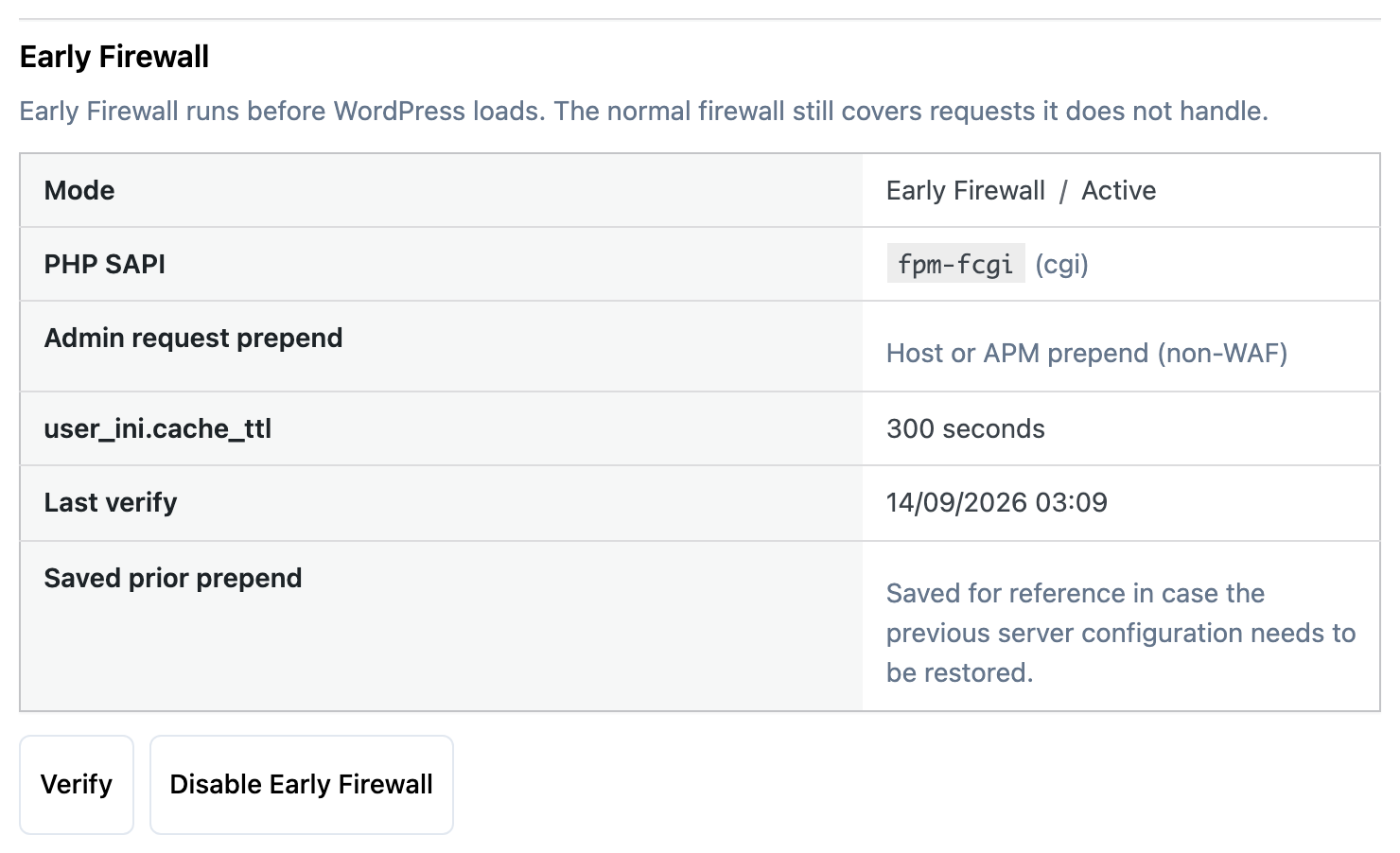
The screenshot is a site where Early Firewall is already active, and PHP was already prepending a host file that is not another firewall. A new install usually starts at Off / WordPress hooks.
The first time you run the Pro installation wizard, an optional step appears after Activate Firewall. Skip that step and you stay on the normal firewall. The step is not shown again after the wizard is finished, or if Early Firewall is already active. You can still enable it later from Firewall settings.
Enable it
- Turn the firewall on and save the secret access URL. Your current IP is whitelisted before Early Firewall is enabled. Opening that URL also whitelists the IP you use.
- Go to Security Ninja → Firewall → Settings and find Early Firewall.
- Click Enable Early Firewall.
- Click Verify. Active means it is running.
- Try the front end, wp-admin, checkout, and any API or webhook you rely on.
If PHP already prepends a host or application file that is not another security firewall, the button reads Enable Early Firewall (chain non-WAF prepend). Confirm only when you recognize that file. Security Ninja runs first, then includes the previous file. If the host locks auto_prepend_file in php.ini, Enable will not become Active, and the WordPress-hooks firewall stays in place.
If another security plugin already owns auto_prepend_file, turn that prepend off first. Security Ninja will not chain a competing firewall. The same applies to a prepend file it does not recognize.
What the status means
| Status | What to do |
|---|---|
| Off / WordPress hooks | Normal firewall. Early Firewall is not installed. |
| Probing or Pending | Wait, then click Verify. |
| On | Regular page views use Early Firewall. Other PHP entry points still use the normal firewall. |
| Active | Early Firewall is running. |
| Installed, firewall disabled | The prepend is in place, but the firewall toggle is off. Turn the firewall on if you want blocks. |
| Removal pending | You turned it off. PHP can keep the old setting for a few minutes (user_ini.cache_ttl, often 300 seconds). Verify removal stays disabled until that wait ends. |
| Failed (safe) | Something went wrong. The panel shows the last error. WordPress-hooks protection stays on. Click Verify, or save Firewall settings, to try again. |
The panel also shows the PHP SAPI, the current prepend path, and the last successful verify.
After you update the plugin
Rule changes are compiled into the Early Firewall config. A plugin update rebuilds that config so the new rules apply. If the rebuild fails, the panel shows an error instead of quietly keeping the old rules. Open Firewall → Settings and click Verify, or save the firewall settings, to retry. Until that succeeds, the WordPress-hooks firewall is the fallback.
Hosts where it stays off
Early Firewall will not enable when:
- The site is WordPress Multisite
- The server is IIS
- PHP or the server type cannot be classified safely
- You are on CGI or nginx and
user_ini.filenameis empty, so.user.inicannot setauto_prepend_file - Another security firewall already owns
auto_prepend_file - An unrecognized prepend file is already set
In those cases the normal firewall keeps working.
Turn it off
Click Disable Early Firewall. Status moves to Removal pending until PHP drops the old prepend. Then click Verify removal. Do not delete the prepend file by hand while PHP still points at it. The panel keeps a note of the previous prepend so you can see what was there.
Custom rules
Filter Suspicious Queries rules can be changed with WordPress filters. On the normal firewall those filters run on each request. For Early Firewall they run when the config is compiled, and that result is what every visitor gets.
Do not write a filter that only changes a rule when a certain query argument is present. That return value can be saved for everyone. Change the rule in a fixed way, then save Firewall settings or click Verify so the config rebuilds.
Details and a named-rule example: Customizing firewall filter rules.